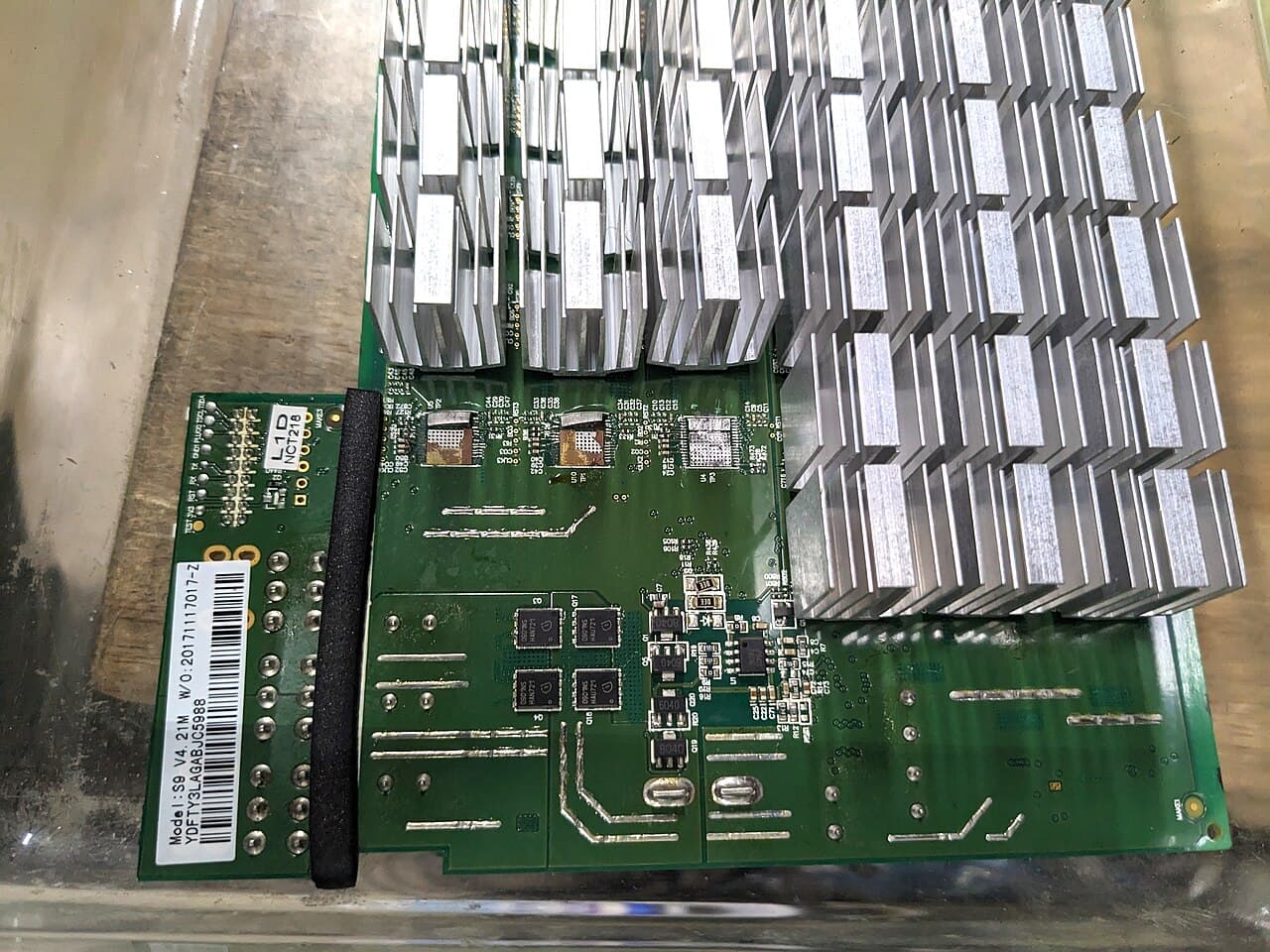
Most hashboard faults are not hashboard faults. A board that is missing, short of chips, running hot or throwing errors can be caused by a loose signal cable, a weak power supply, bad grounding, dust, or the control board. Troubleshoot from the outside in: read the log, check the environment, reseat and swap cables, try a known-good power supply, and only then conclude the board needs repair. Real board faults need a test fixture and chip-level rework, which is work for a repair centre.
Key points
- Save the log and a screenshot of the status page before you change anything.
- Do the non-invasive checks first: environment, network, firmware, cables, power supply.
- Change one thing at a time and note the result. The aim is to see whether the fault follows the board, the cable, the port or the power supply.
- Do not move hashboards between machines under warranty. Bitmain treats non-original boards as a mixed-board machine, which voids warranty.
- Power off and unplug before touching any connector, and take static precautions.
What the control board sees
A hashboard carries a long chain of ASIC chips, with temperature sensors and a small memory chip that identifies the board. At start-up the control board powers each board, reads its identity, and counts the chips that answer along the chain. It then monitors temperature, hashrate and hardware errors (hashes the chips computed wrongly). A break anywhere in the chain, a sensor that cannot be read, or unstable supply voltage shows up as one of a handful of symptoms.
Symptoms and first suspects
| Symptom | Common causes | Check first |
|---|---|---|
| Board missing from the status page | Signal cable loose or damaged, board not powered, control board port fault, failed board | Reseat and swap the signal cable; check power connections |
| Zero or too few chips detected | Power supply weak or unstable, poor grounding, cable fault, damaged chip or solder joint | Known-good power supply, grounding, cable |
| Low hashrate on one board | Overheating, dust, high error rate, chips dropping out | Temperatures, cleaning, cable |
| Low hashrate on all boards | Network or pool problem, power supply, environment, firmware | Pool settings and latency, supply voltage, intake temperature |
| High temperature on one board | Blocked heatsink, failed fan on that side, poor airflow, sensor fault | Dust, fans, neighbouring exhaust |
| High hardware errors | Marginal power, heat, damaged signal cable, failing chips | Power supply, temperature, cable |
Before you open anything
- Power. Shut down, switch off and unplug. Bitmain warns that working on a connected miner damages the control board.
- Static. Wear an anti-static wrist strap. Handle boards by the edges.
- Warranty. Read the terms for your model. MicroBT's policy excludes damage from disassembly without its authorisation, and its guide tells owners to consult its support staff before removing a hashboard. Bitmain recommends returning the whole machine for repair.
- Manual. The manufacturer's manual for your exact model is the authority on connectors and disassembly.
Diagnostic flow
- Capture the evidence. Save the full log from start-up and screenshot the status page. On Antminers, Bitmain advises reading the current log when a machine is in a fault state. Note which board position is affected, how many chips were found, and the temperatures.
- Check the environment. Confirm intake air, or coolant supply for liquid-cooled units, is inside the published range, that exhaust air is not recirculating, and that heatsinks are not blocked.
- Check the network if every board is affected. Verify pool address and worker settings. Bitmain's test is a ping to the pool showing no packet loss and an average delay below 100 ms.
- Restart once. A single clean restart clears transient faults. Do not restart repeatedly; Bitmain warns that repeated restarts on a faulted machine can turn a repairable fault into an unrepairable one.
- Reseat the cables. With power off, unplug and firmly reseat the signal cable at both ends for the affected board, and check the board's power connections. On models with copper bus bars, Bitmain says to check the bars for poor contact and loose screws. Inspect for bent pins, scorch marks and corrosion.
- Swap the signal cable. Exchange the affected board's signal cable with one from a working board in the same machine. If the fault moves to the other board, replace the cable.
- Change the control board port, if your model's manual allows the ports to be exchanged. If the fault stays with the port and not the board, suspect the control board.
- Try a known-good power supply of the correct model. Bitmain's first step for missing chips and for a status page showing chips as failed is to test with a good power supply and confirm the miner is properly grounded.
- Reload firmware. Bitmain suggests upgrading firmware or re-flashing from an SD card for some sensor and controller faults before sending a machine for repair. Use only firmware for your exact model.
- Conclude. If the fault has stayed with the same board through steps 5 to 9, the board needs board-level repair.
Reading the result
| The fault follows | Conclusion |
|---|---|
| The signal cable | Replace the signal cable |
| The control board port | Control board fault. See Control Board Replacement |
| Nothing; it clears with another power supply | Power supply fault or inadequate supply voltage |
| The hashboard itself | Board-level repair |
About swapping boards
Moving a suspect board into another machine is a strong test, but it has a cost. Bitmain defines mixed boards as any hashboard or control board that is not an original part of that product, and voids warranty for such machines. MicroBT's guide tells owners to refit hashboards by serial number. Boards also need to match in model and specification; Bitmain's own repair process binds replacement boards to the machine and runs an ageing test. Keep board swaps for out-of-warranty machines of identical type, and record which board came from where.
What Antminer logs say
Bitmain documents the following messages. They apply to the models named; other models and manufacturers use different wording.
| Log message | Applies to | Bitmain's explanation and action |
|---|---|---|
Chain 0 only find 0 asic,will power off hash board 0 |
S19 XP | Chips cannot be found. Power off, unplug and reseat the cable. If unchanged, repair |
Sweep error string = V:1 |
S19 XP | Power supply abnormal. Check the power cord, voltage regulation cable and copper bar, or replace the power supply |
Sweep error string = P:1 |
S19 XP | High-temperature protection. Check ambient temperature and that the air inlet is not blocked |
Sweep error string = J:6 |
S19 XP | Temperature sensing abnormal. Generally needs repair |
fail to read pic temp |
19 series | The PIC, a controller chip on the hashboard, is abnormal. Cross-check cables, try a firmware upgrade or SD card flash, then return for repair |
For WhatsMiner machines, MicroBT states that the error code shown in WhatsMinerTool identifies which board has the problem.
Environmental causes to rule out
- Heat. Bitmain's general recommendation for air-cooled Antminers is 5 to 35 °C.
- Dust and debris on heatsinks. See How to Clean an Antminer.
- Humidity and salt air, which corrode boards and connectors.
- Cold starts. Bring the room above the model's minimum before powering on.
- Supply voltage and grounding. Have a qualified electrician check the circuit if several machines on it misbehave.
- For hydro units, closed valves, low flow or coolant outside its temperature range.
When it needs board-level repair
Bitmain's fault summary lists the conditions that generally require repair once cables have been reseated: incomplete chip count, abnormal hardware version, controller fault, temperature sensor fault and memory chip fault. Add any board with visible burns, corrosion, lifted heatsinks or cracked components.
Board-level repair means running the board on a hashboard test fixture, a tester that powers a single board and locates the failing chip or stage, then replacing that part with rework equipment and re-testing. Bitmain supplies test fixtures for specific model families, so the fixture has to match the board. This is specialist work; without the fixture, the right chips and practice, the likely result is a scrapped board.
Bitmain will not repair boards it classes as scrap, including corroded, burnt or fractured boards. It also cautions that a board repaired on its own is guaranteed only to pass the test, not to reach its original hashrate once back in the machine, which is why it recommends sending the complete miner.
Information to gather for a repair or parts request
- Miner model and exact version, including the hashrate variant on the label.
- Miner serial number, and the serial number and version markings on the affected hashboard.
- Control board type, power supply model and firmware version.
- The full log from start-up, as a text file, and a screenshot of the status page.
- Which board position is affected, chips found against chips expected, and temperatures.
- Site conditions, when the fault started and the results of each swap test.
- Photos of any visible damage.
- Purchase date and warranty status.
For a replacement, match the board to the machine's model, version and hashrate grade; see hashboards.
Sources
- Bitmain Support, "Common Problems and Solutions for ANTMINER (19 series)", https://support.bitmain.com/hc/en-us/articles/4406645619097-Common-Problems-and-Solutions-for-ANTMINER-19-series, checked 2026-10-01.
- Bitmain Support, "S19 XP log diagnosis and processing methods", https://support.bitmain.com/hc/en-us/articles/10845468564633-S19-XP-log-diagnosis-and-processing-methods, checked 2026-10-01.
- Bitmain Support, "Troubleshooting and solutions for ANTMINER failures", https://support.bitmain.com/hc/en-us/articles/18237912339097-Troubleshooting-and-solutions-for-ANTMINER-failures, checked 2026-10-01.
- Bitmain Support, "ANTMINER ASIC status showing X", https://support.bitmain.com/hc/en-us/articles/360023106653-ANTMINER-ASIC-status-showing-X, checked 2026-10-01.
- Bitmain Support, "Precautions and risks of sending hashboard only for repair", https://support.bitmain.com/hc/en-us/articles/25857846551065-Precautions-and-risks-of-sending-hashboard-only-for-repair, checked 2026-10-01.
- Bitmain Support, "The Definition of Combined Machine Repair", https://support.bitmain.com/hc/en-us/articles/45545155672857-The-Definition-of-Combined-Machine-Repair, checked 2026-10-01.
- Bitmain Support, "Scrapped machines will not be repaired", https://support.bitmain.com/hc/en-us/articles/220667768-Scrapped-machines-will-not-be-repaired, checked 2026-10-01.
- Bitmain Support, "Directions for Hashboard Test Jigs", https://support.bitmain.com/hc/en-us/articles/900000305506-Directions-for-Hashboard-Test-Jigs, checked 2026-10-01.
- Bitmain Support, "Do's and Don'ts of a New ANTMINER", https://support.bitmain.com/hc/en-us/articles/360001836994-Do-s-and-Don-ts-of-a-New-ANTMINER, checked 2026-10-01.
- Bitmain Support, "Miner Maintenance TIPS for Low Temperature Areas", https://support.bitmain.com/hc/en-us/articles/27248959040025-Miner-Maintenance-TIPS-for-Low-Temperature-Areas, checked 2026-10-01.
- MicroBT, "WhatsMiner Air Cooling Miner Operation Guide V2.1" (PDF), https://aws-microbt-com-bucket.s3.us-west-2.amazonaws.com/WhatsMiner%C2%A0Air%20Cooling%C2%A0Miner_Operation%C2%A0Guide_V2.1_1785321564318.pdf, checked 2026-10-01.